






QR codes with web analytics
QR code tracking: create and measure QR codes with your logo
See which flyers, posters and packaging bring visitors to your website — and whether they lead to enquiries or purchases. Without cookies, directly in your Trackboxx dashboard.
Trackboxx featured in


What does your QR code really deliver?
Printed campaigns are often a blind spot. With Trackboxx, you can track every QR code: see how many visitors reach your website through it, what they do there and whether they make enquiries or purchases.
- QR codes and web analytics in one dashboard
- Destination: your website with the Trackboxx code installed
- Included in the Business plan — try it free for 30 days
A separate QR code for every medium
Flyer, poster or package insert: give each medium its own QR code. Trackboxx then shows you how many visitors each code brings, which goals they achieve and how much revenue they generate — alongside your web analytics.
See which flyer, poster or insert actually delivers results — and where your print budget should go next time.
QR code without tracking
- You don’t know how many people scan it
- You don’t know which medium works
QR code with Trackboxx
- Visitors per code
- Goals and revenue per code
- Compare all codes, up to 30
Everything for your QR campaigns in one place
Create, manage and measure — directly in your Trackboxx dashboard, alongside your web analytics.
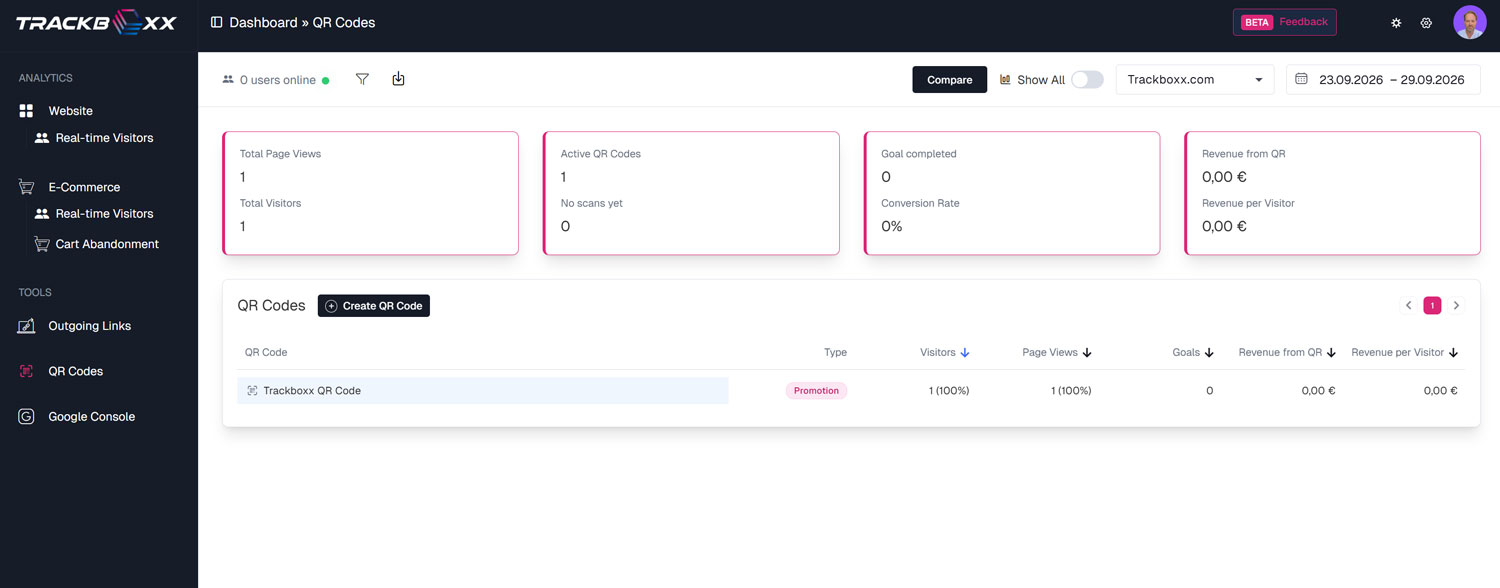
- Create QR codes with your logoCreate QR codes directly in the dashboard and add your logo.
- Manage centrallyKeep all your campaign QR codes in one place instead of scattered across tools and folders.
- One code per mediumFlyer, poster or packaging: each medium gets its own code. See which medium brings visitors.
- Measure visitors, goals and revenueFor each QR code, the report shows how many visitors it brings, which goals they achieve and how much revenue they generate.
Where QR code tracking is worthwhile
Anywhere printed materials should lead people to your website. Make your QR code marketing measurable — Trackboxx answers a specific question for each medium.
Flyer
Which distribution location brings the most visitors?
Posters and trade fairs
Which location is worthwhile?
Packaging
How many customers open the instructions or the offer?
Business cards
How many people visit your website after the meeting?
Print advertisements
Which advert generates enquiries?
Tip: for links without a QR code — in newsletters or social media, for example — use our free UTM Builder.
Set up QR code tracking in 3 steps
No technical expertise needed: if Trackboxx is already running on your website, you can create your first QR code quickly.
Create a QR code
Create a QR code in the dashboard and enter a page on your website as the destination.
Print with your logo
Download your code with your logo, scan it yourself once, then put it on flyers, posters or packaging.
See the results
Track visitors, goals and revenue for each QR code in your dashboard.
Not using Trackboxx yet? Install it using a plugin for WordPress, JTL, Shopware, Shopify and ePages or by adding the code. You can find all the guides in the Help centre.
QR code tracking without cookies
Trackboxx does not use cookies. The person responsible for data protection at Trackboxx cites legitimate interest under Article 6 GDPR as the legal basis. In our view, Trackboxx does not require separate opt-in consent — and therefore does not require a cookie banner.
This is not legal advice. Other services on your website may still require consent. If in doubt, ask your data protection officer.
- No cookiesThe visitor-recognition hash changes daily, so visitors cannot be tracked across different days.
- Servers in Frankfurt am MainMade in Germany, hosted in a Frankfurt data centre.
- Only the data you needVisitor numbers, page views, traffic sources, bounce rate and devices.
- No additional tool neededQR codes and web analytics in one account — one login, one dashboard.
QR codes in the Business plan
QR code tracking is part of the Business plan, alongside e-commerce tracking and Google Search Console. Try everything free for 30 days, with no payment details required.
- QR codes and web analytics in one plan
- For up to 10 websites
- Try free for 30 days
Business
or from €120 per year
- Up to 30 QR codes with your logo and reporting
- Up to 10 websites
- e-commerce tracking
- Google Search Console
Free and Basic do not include QR codes. Trackboxx is exclusively for businesses.
Questions about QR code tracking
Can’t find your question? Get in touch using the Contact form.
How can I tell which flyer delivers the best results?
Create a separate QR code for each medium, such as each flyer, poster and package. In the dashboard, compare visitors, goals achieved and revenue per code.
Which page makes a suitable destination?
Any page on your website with Trackboxx installed, such as a promotion page or your shop. For printed codes, choose a page that will remain available for as long as the code is in circulation. You can change its content at any time.
What does QR code tracking show me?
For each QR code, you can see how many visitors it brings to your website, which goals they achieve — such as submitting a contact form — and how much revenue they generate.
Can I add my logo?
Yes. You can customise your QR codes with your logo.
How many QR codes can I create?
The Business plan lets you create up to 30 QR codes.
Can I create QR codes with tracking for free?
Yes, in the 30-day trial, free of charge and without payment details. After that, QR codes are part of the Business plan, from €12 per month or from €120 per year. Free and Basic do not include QR codes.
Do I need a cookie banner?
In our view, not for Trackboxx: Trackboxx does not use cookies and uses a hash that changes daily to recognise visitors; separate opt-in consent is not required for this. This is not legal advice — other services on your website may still require consent. If in doubt, ask your data protection officer.
Does Trackboxx need to be installed on my website?
Yes. Trackboxx analyses the visitors on pages where the Trackboxx code is installed. The easiest way is with a plugin for WordPress, JTL, Shopware, Shopify or ePages – or via code in the header.
What happens to my QR codes if I cancel?
If you cancel, your QR codes in Trackboxx are deleted and the analysis ends. So you only get figures for a printed code as long as your account is active.